Quick answer
Evaluate a finance ERP when your problems require coordinated changes across accounting, operational workflows, reporting and access controls—not simply another feature.
Start by testing whether better configuration, an accounting-software upgrade or a targeted integration can meet your requirements. Consider replacement when those options leave important gaps, and proceed only after a proposed ERP demonstrates the required workflows and your team can support implementation.
Understand what an ERP would actually replace
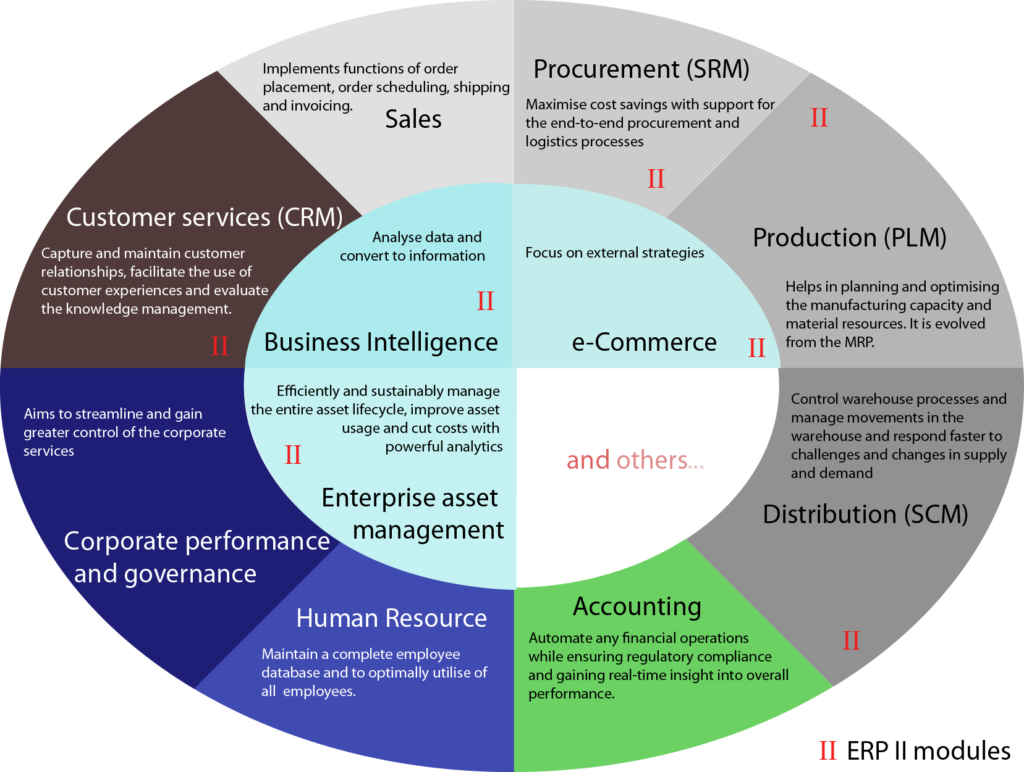
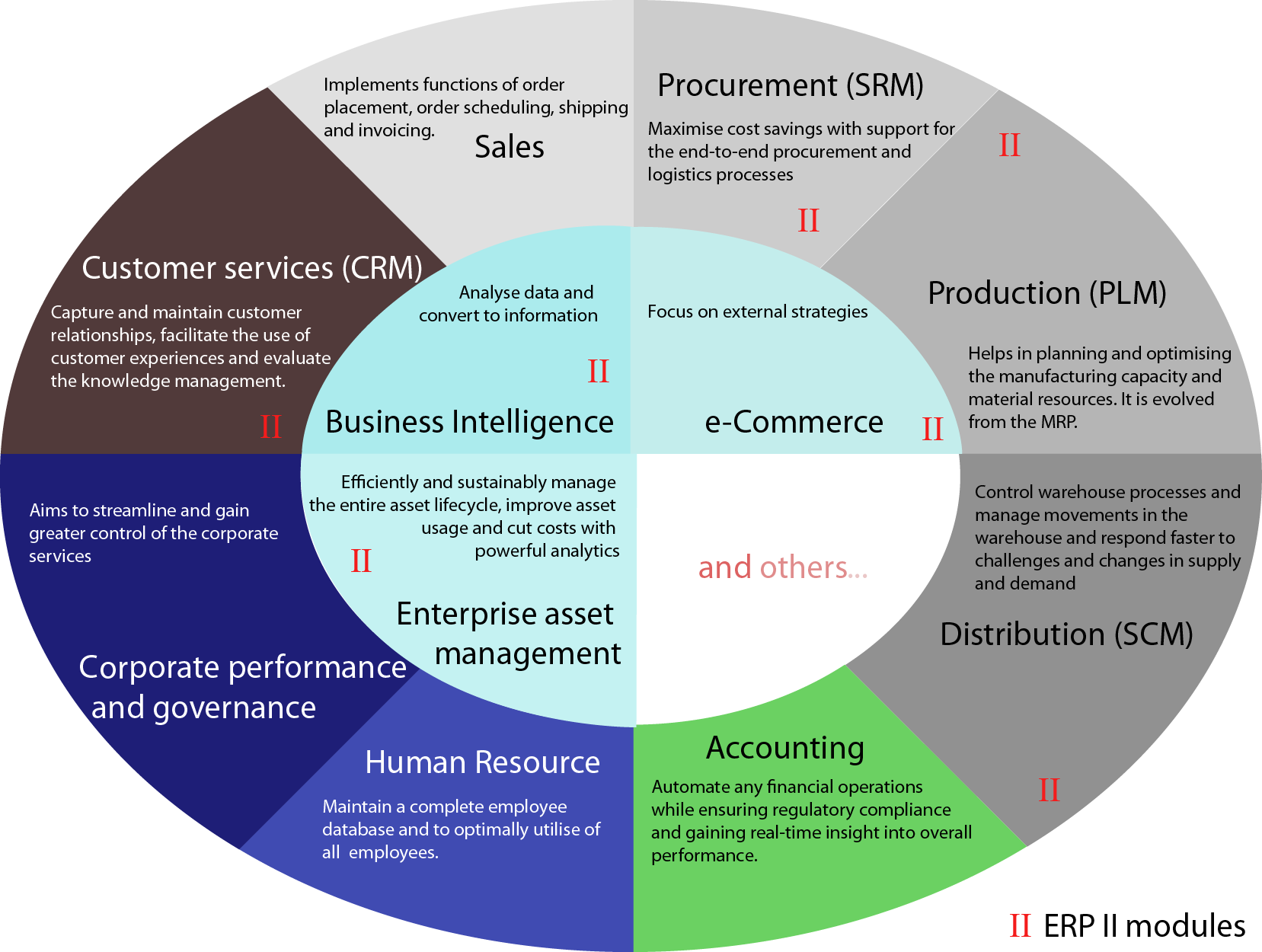
An ERP is not an alternative to accounting. Accounting is part of its scope. The distinction is the broader connection between financial records and business processes: ERP suites can bring accounting together with activities such as purchasing, order processing and planning. Exact capabilities depend on the product and purchased components. (oracle.com)
For this decision, define finance ERP as the proposed combination of financial applications, connected workflows and administration tools—not as a guarantee that everything is included.
Write down the boundaries of your proposed replacement:
- Which system will hold the general ledger?
- Where will invoices, purchasing approvals and customer records originate?
- Which specialist applications will remain?
- Who will maintain integrations, permissions and reports?
Check product boundaries carefully. Microsoft’s published Finance documentation, for example, directs readers to Supply Chain Management for purchasing, inventory and manufacturing capabilities. A finance application’s name alone does not establish the scope of the complete solution. Source: Microsoft Finance home page.
Your goal is a workable operating model, not the largest software footprint.

Look for five operational signals
Use the following signals to build an evaluation case. Treat them as questions to investigate, not an automatic replacement score.
1. Entity complexity is becoming difficult to manage.
Document how you handle separate company books, intercompany balances, account mapping, currencies and group reporting. Ask whether the difficulty comes from missing functionality or inconsistent setup.
Consolidation is a specific capability to verify. Business Central, for example, documents consolidation across companies with different charts of accounts, fiscal years and currencies. It also requires setup and recommends checking data before consolidation. Do not assume every accounting package or ERP edition works the same way. (learn.microsoft.com)
2. Transaction processing cannot meet your operating requirements.
Replace “we have too many transactions” with a reproducible test. Record peak invoice batches, concurrent users, import sizes, posting delays and exception queues.
Ask candidates to process a representative workload, including integrations. Microsoft’s implementation guidance specifically recommends performance testing with peak transaction volumes and representative environments. Revenue or employee count is not a substitute for testing your workload. (learn.microsoft.com)
3. Disconnected workflows require repeated intervention.
Trace a purchase from request through approval, receipt, invoice and payment. Then trace a customer transaction through billing, collection and ledger posting.
Mark every re-entry, file transfer and reconciliation. Ask whether one controlled interface would resolve the problem, or whether several departments need a shared workflow. ERP’s broader process scope makes that distinction worth investigating. (oracle.com)
4. Reporting requires rebuilding the same information.
Separate missing data from missing presentation. Is departmental information never captured, inconsistently coded or merely difficult to display?
Microsoft’s financial reporting documentation illustrates the distinction: reports can use financial dimensions and scheduled generation, but report design still depends on the underlying accounts and dimensions. Test both data capture and output. Source: Microsoft financial reporting documentation.
5. Required controls cannot be demonstrated.
List the activities that should be separated, such as maintaining vendor information, acknowledging receipt and processing payment. Microsoft documents role-based security and segregation-of-duties rules for these kinds of conflicts in finance and operations apps. These are capabilities to configure and validate, not assurances created by buying an ERP. (learn.microsoft.com)
Compare improvement, upgrade, integration and replacement
Before issuing an ERP request for proposal, compare four possible responses.
| Option | Investigate it when | Evidence to request |
|---|---|---|
| Improve the current setup | Existing features appear sufficient, but configuration, coding or ownership is inconsistent | A corrected workflow using representative transactions |
| Upgrade accounting software | A supported tier or version appears to cover the documented gaps | Confirmation of exact features, limits, migration steps and licensing |
| Add an integration or specialist tool | The ledger remains suitable and the problem is concentrated in a defined process | End-to-end reconciliation, failure handling and a named support owner |
| Replace with a finance ERP | Requirements span several connected processes and alternatives leave material gaps | A configured demonstration, dependency list and implementation plan |
This table is a decision framework, not a vendor ranking.
Make each alternative answer the same question: Can it meet the requirement under normal and exception conditions, at an acceptable cost and administrative burden?
Reject vague comparisons such as “ERP is more scalable.” Require evidence showing what your proposed configuration can process and how the result is checked.
Build a baseline before comparing costs
Create a problem register using a representative close period and operating workload. For each issue, record:
- The process and accountable owner.
- The frequency and operational consequence.
- Staff effort, distinguishing active work from waiting.
- Relevant errors, rejected records or reconciliation differences.
- The attempted remedy and its outcome.
- A testable acceptance criterion.
Use your own records. Do not turn vendor benefit statements into assumed savings.
Illustrative workload calculation—not measured business data: suppose a company assumes that staff re-enter 240 invoices each month, taking three minutes per invoice. The arithmetic is:
240 × 3 ÷ 60 = 12 staff-hours per month.
That estimates only the assumed re-entry effort. It does not establish that an ERP would remove all 12 hours, reduce payroll expense or outperform an integration. Add validation, exception handling and support effort to each proposed option before comparing them.
Build a consistent cost model covering subscription or license charges, implementation services, data cleanup, integrations, reporting, training, internal project time and ongoing administration. Ask each supplier to identify exclusions and dependencies.
The useful comparison is between complete options—not the current subscription and an ERP’s headline price.

.jpg)
Apply the decision to three hypothetical businesses
These examples illustrate reasoning, not customer experiences or predicted results.
A service business should investigate configuration or an upgrade first.
Assume a single-entity consultancy has straightforward billing, but managers cannot obtain reliable departmental expense reports. Its existing software can capture the required department codes; staff simply use them inconsistently.
The first test should be corrected coding rules, ownership and report setup. Consider an upgrade only if the current version lacks a verified requirement. The reporting complaint alone does not establish a need to replace the ledger.
A distributor should test a targeted integration.
Assume a distributor’s accounting system meets its ledger and control requirements, but staff manually transfer completed sales from a separate order system.
Test an integration that transfers the required records, identifies rejected transactions and reconciles source totals to posted totals. If it meets the acceptance criteria, retain the accounting system. Reopen the ERP question if purchasing, receiving, inventory and finance also need coordinated redesign.
A multi-entity group has a stronger reason to evaluate ERP.
Assume a group maintains separate company files, manually reconciles intercompany activity and repeatedly reconstructs group reports. Approval and access requirements also differ across entities.
An ERP evaluation is reasonable because the requirements cross reporting, transaction processing and administration. Still compare it with retaining subsidiary ledgers and adding consolidation functionality. Require proof of entity-level permissions, consolidation adjustments and reconciliation—not merely a dashboard demonstration.
Turn requirements into a demonstration script
Give shortlisted suppliers the same scenarios and expected results.
- Entity reporting: Produce separate and combined results, showing account mapping and relevant adjustments.
- Transaction processing: Import and post a representative batch, including invalid records.
- Purchasing workflow: Show approval, receipt, invoice exceptions and payment preparation.
- Management reporting: Produce the required statement and trace a selected balance to supporting records.
- Access controls: Demonstrate permitted actions and attempted conflicting assignments.
- Integration failure: Show how a failed transfer is detected, corrected and reconciled.
For every requirement, classify the proposed answer as included functionality, configuration, an additional module, a third-party product, customization or unavailable.
Document the exact edition, deployment model, region and dependencies. Microsoft’s supplied financial reporting overview, for example, states that add-in availability depends on cloud, geography and applicable entitlement. Availability should therefore be checked against the proposed environment, not inferred from a general feature list. Source: Microsoft financial reporting overview.
Also test controls after configuration. Microsoft explicitly warns that creating a segregation-of-duties rule does not itself validate existing roles and assignments; compliance must be checked afterward. (learn.microsoft.com)
Check whether the organization is ready
A reason to evaluate ERP is not the same as readiness to implement it.
Use this proposed checklist before approving a project:
- Business ownership: An executive sponsor and process owners can make decisions.
- Defined scope: Required workflows, retained systems and exclusions are documented.
- Data ownership: Someone is accountable for accounts, dimensions, customers and vendors.
- Migration scope: The team has decided what history, balances, open items and attachments it needs.
- Reconciliation plan: Finance has defined how migrated balances and open items will be checked.
- Testing capacity: Users have protected time to test realistic transactions and exceptions.
- Security design: Proposed roles and approval responsibilities have named reviewers.
- Cutover controls: Decision points, verification steps and recovery arrangements are documented.
- Operational support: Administrators and support owners have allocated time and training.
- Funding: The budget includes internal effort and post-launch support.
These checks align with Microsoft’s published emphasis on agreed scope, user acceptance testing with migrated data and appropriate roles, repeated migration trials, cutover sign-off and support readiness. They are not a substitute for a product-specific implementation plan. (learn.microsoft.com)
Make a documented decision—not a size-based one
Close the evaluation with a short decision record containing:
- The business problem and supporting evidence.
- The alternatives tested.
- Unresolved gaps and accepted risks.
- The proposed solution’s dependencies.
- Implementation ownership and approval conditions.
Avoid three shortcuts: treating every spreadsheet as evidence of system failure, assuming ERP automatically supplies effective controls, and comparing options without including implementation and support work.
Choose improvement, an upgrade or integration when it demonstrably meets the requirements. Choose ERP replacement when its broader scope is necessary, its proposed configuration passes your tests and your organization can implement and administer it.
The decision should follow verified requirements and demonstrated fit—not a vendor’s preferred growth milestone.